

- What permissions do you give others to modify and/or maintain your submission?
- Modify: YES - Maintain: YES - I give permission for my entire submission to be modified by others or used in their own work. I give permission for my entire submission to be maintained by others as well.
Hi, you've reached the custom build Reveries! This mod aims to provide a gameplay experience vastly different from vanilla via a comprehensive overhaul to the physics, characters, shields, and much more! Not the maps though, they're the same.
As the primary flavour of my SRB2 Cherry project this also contains bonus quality of life features shared with Redberries such as the shield button and gamepad refactor.
IMPORTANT: due to config incomptability with vanilla, Reveries will use reveries.cfg instead of config.cfg. You can either copy and rename your config.cfg or set up your controls again. There's now a Shield button and a few other new settings, so keep that in mind. I also changed several defaults to ones more suitable for Reveries gameplay, but it's not a huge deal if you'd rather import your old config.
ALSO IMPORTANT: Use the win32 download unless you want to install the game as a standalone with its own folder, in which case use the win64 download. This only applies to Windows, if you are on Linux ignore the download button and check out the official flatpak at https://flathub.org/en/apps/io.github.srb2.rphys
About 3D models:

Jump+Jump: Comet Dash
Launch forwards with a burst of speed. Collide with a wall while holding jump to rebound upwards.
Jump+Spin: Drop Boost
Hold spin to charge an enhanced drop dash that gets stronger the faster you're moving.
Shield: Super Peelout
Attain supersonic speed, but jumping or rolling will end it.
Tips:
1) Bop an enemy after the Comet Dash ends to refresh the dash. This also resets the wallbonk counter, so you can take advantage badnik bouncing to scale higher than you could normally.
2) Drop Boost may be used after a Comet Dash, Anti Flying Turtle Roll, and even certain Shield Abilities.
3) Super Peelout state won't be lost in the air as long as you're not jumping or rolling. You can even maintain it across spring launches!

Jump+Jump Fly
Start flying for a limited time. Hold the jump or spin button to ascend or descend at the cost of speed.
Passive: Pickup
Carry around allies while flying! Press the shield button to throw your friend forwards.
Tips:
1) Fly has two states: passive flight and active flight. You begin flying in the active state, so simply release the jump button to switch to the passive state.
2) The flight timer only decreases while Tails is in active flight. Pay attention how quickly the tails are rotating: if they're fast, you're in active flight and thus losing flight timer.
3) Active flying doubles the power of air drag and caps your top speed to 2/3 of normal.

Jump+Jump: Glide
Glide in the air as long as jump is held. Collide with a wall to begin climbing it.
Passive: Bulldoze
While running or gliding, Knuckles will automatically damage enemies with his fists.
Tips:
1) Jumping off a wall with the jump button to point the camera away from the wall. Press spin instead to jump without changing the camera.
2) Glide & Bulldoze only deal damage from the front of Knuckles.
3) If you glide into the ground, you'll start skidding to a halt. Release jump as soon as possible to exit the skid and keep most of your speed!
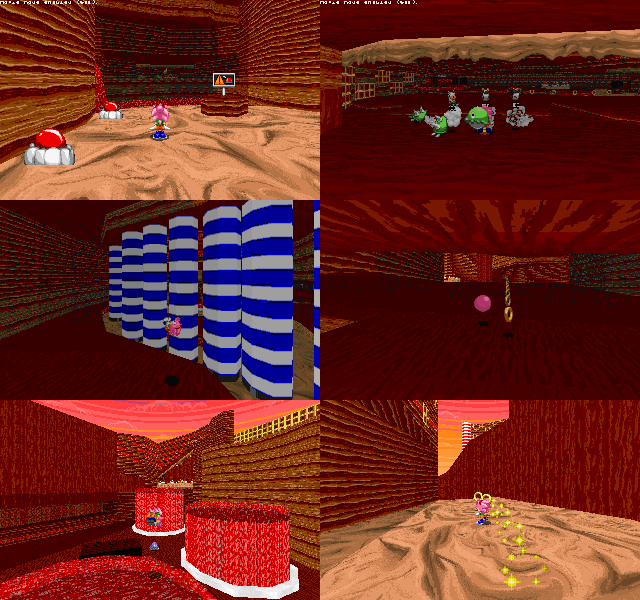
Jump+Jump: Lovely Ascent
Use the power of love to jump again in the air somehow. This refreshes everything a normal jump would, including your Hammer Spin! Also, you can bop an enemy to regain the ability.
Jump+Spin: Hammer Spin
Hold spin during a jump to rapidly rotate and fall faster over time. Hit the ground for a speed boost.
Shield: Hammer Twirl
Press shield on the ground to perform a spiral attack with Amy's hammer.
Tips:
1) Strike a spring with any hammer action to increase its power.
2) Hammer actions provide a significantly increased attack range. You can even use your hammer to pick up rings and some other goodies!
3) Using either Turtle Roll variant will immediately initiate a Hammer Spin.
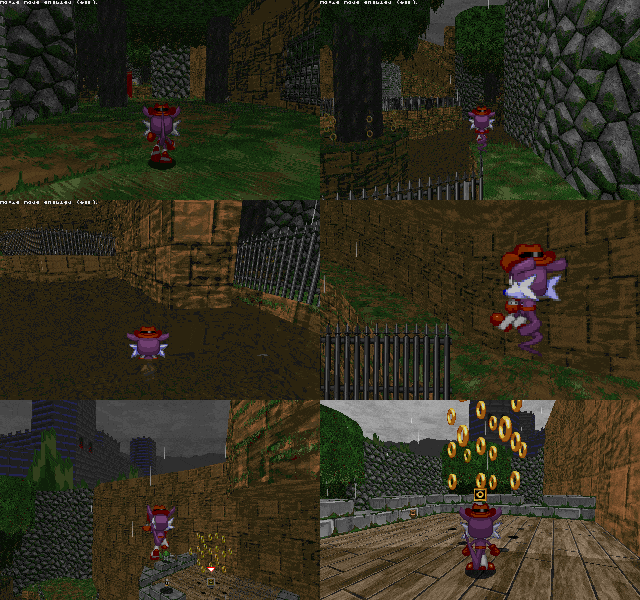
Jump+Jump: Tail Bounce
Bounce off the ground and most hazards as long as jump is held. This can also destroy some floors.
Spin: Pop Gun
Fire a cork at the nearest target. You won't be able to move while firing.
Passive: Jerboa Time
Gets bonus jump leniency when walking off an edge.
Tips:
1) While bouncing, Fang both ignores air drag and gains a small speed boost each time he lands.
2) Releasing jump during a bounce has the same upwards momentum canceling effect releasing jump during a normal jump does. Use this as an emergency brake if you're ascending too quickly!
3) You can use the gun and shield abilities both before and after a Tail Bounce, but not during one.

Jump+Jump: Jet Burst
An aerial thrust which gets stronger during dash mode. Keep holding the jump button to resist gravity.
Spin: Quick Roll
Perform a speedy somersault. Hit a target for a boost.
Shield: Super Burnout
If not in dashmode, stop and gather energy. Otherwise, charge up a robo blast of speed!
Tips:
1) Dash mode can't be lost while in the air, but can only be obtained while on the ground.
2) If you hit a wall or slow down too much, Jet Burst will cancel.
3) Jet Burst allows you to ignore air drag while active.
A few character abilities can be toggled via console commands.
Certain maps may have issues due to the higher gravity. I've done my best to mitigate this but it's impossible to fix everything.
The majority of custom characters should work fine.
Lua can check for the global
There is a new hook:
Clairebun: original turning code
Chrispy & Lach: trick star sprites + code
Skydusk, Kumin, TehPuertoRicanSpartan, KamiJoJo_, Team Springs et al: Pipe Towers Revamped
ClovesCloestar: new springs and other assets
Logan McCloud: misc sprite replacements
Princess Plushima: FlowBubble
SonicX8000: hud replacments
Lactozilla: original gamepad refactor
SuperPhanto: peelout sprites
Golden Shine: comet dash vfx sprite
Krabs: ring sprite
DirkTheHusky: dropdash sprites
As the primary flavour of my SRB2 Cherry project this also contains bonus quality of life features shared with Redberries such as the shield button and gamepad refactor.
IMPORTANT: due to config incomptability with vanilla, Reveries will use reveries.cfg instead of config.cfg. You can either copy and rename your config.cfg or set up your controls again. There's now a Shield button and a few other new settings, so keep that in mind. I also changed several defaults to ones more suitable for Reveries gameplay, but it's not a huge deal if you'd rather import your old config.
ALSO IMPORTANT: Use the win32 download unless you want to install the game as a standalone with its own folder, in which case use the win64 download. This only applies to Windows, if you are on Linux ignore the download button and check out the official flatpak at https://flathub.org/en/apps/io.github.srb2.rphys
Jeck's models work with Reveries, supporting all of the vanilla cast's custom frames excluding the Drop Boost but you need to use the models included with SRB2 versions 2.2.13 or higher, not the ones in the Jeck Jims models addon. As as of 15/05/2025, the vanilla cast models on the message board's Jeck Jims model pack are still outdated so if you install all the models from there they will get overridden. Steam Deck & Linux Flatpak users can ignore this message as the correct models are already installed thanks to the power of extra-data grabbing them directly from the 2.2.15 assets folder.
The
The
models.dat included with 2.2.15 has the pity shield scaled way too big compared to other shields. This makes the Armageddon overlay look very silly with models on. If you care about fixing this, open models.dat and change the line PITY OBJE/PITY.md3 2.7 0.0 to PITY OBJE/PITY.md3 2.4 0.0 which is the intended scale.
| Reveries Physics |
|---|
- Better gamepad support
- Includes bindable triggers and proper analogue stick tilt response
- You can also change the menu confirm button in Player 1's Gamepad Settings
- Momentum past your top speed is preserved while on the ground
- Linear acceleration and friction, similar to the classic sonic titles
- Slope physics are drastically altered
- Higher gravity, higher jump heights
- More maneuverability while jumping or spinning
- Spindash min charge speed is significantly increased
- Jerboa Time, a short window after walking off an edge where you can still jump
- Only a few frames by default, but each frame of input latency increases its duration
- Reworked airwalk to only happen during Jerboa Time
- Save files from unloaded addons now tell you who the file belongs to
- Air drag: while above top speed in the air, your speed will slowly degrade until you drop down to top speed.
- Spinning as well as certain character abilities will completely bypass air drag
- Quick Spindash! Press spin during a skid to instantly spindash without needing to completely stop.
- Characters may roll upon landing even after using an ability (when appropriate)
- Better resolution support and ability to resize the window into any arbitrary resolution
- Why is this noted in the physics section? I dunno, but the gamepad thing was already here...
- Spin characters may use the Flying Turtle Roll by pressing Spin while springing upwards - this is a defensive manuever which cuts your spring launch short and enters a roll state. There are many applications for this move, but it's up to you to discover them.
- Spring tricks!
- Press jump within the first few frames of launching off a spring to perform a trick! You'll launch in stylish Sonic CD-esque fashion and gain a sparkle trail, making your descent slightly floatier and enabling the use of your Jump+Jump ability until you land or are otheriwse interrupted.
- While ascending during a trick, any character can use the Super Turtle Roll with Spin regardless of their ability to perform the normal variant. You'll shoot downwards at high speed!
- A few addon characters are excluded from the trick system due to conflicts with their design or code.
- Many minor changes not worth listing individually
| Reveries Shields |
|---|
- Force Shield
- Replaced the Force Stop with Force Stasis: hold down the Shield button to stall in midair, and release to restore your previous speed in the direction the camera is facing. You can also press Jump to redirect your speed downwards.
- Enhanced passive: Taking damage with a fully reinforced Force Shield won't stun you.
- Elemental Shield:
- Replaced the Elemental Stomp with Elemental Rise: cancel all momentum and rocket directly upwards, detonating in a burst of flame (or bubbles) at the end. Press the Shield button again to detonate early!
- Enhanced passive: Fire trail also generates while running in addition to rolling.
- Whirlwind Shield:
- Added a particle effect when using the ability. This shield was pretty good as is, and its activation conditions makes more sense thanks to the new Shield button.
- Emergency jump can also be activated with the Shield button instead of only Jump.
- New passive: Gain immunity to Canarivore gas.
- Attraction Shield:
- Ability is now the Attraction Dive: perform a homing attack if locked on, otherwise dive downards (and also forwards if you're below normal top speed)
- Grants a period of invulnerability while the shield remains bright.
- Successfully striking an enemy will refresh all of your abilities, not just the homing attack.
- Basic Shield + Armageddon Charge:
- The Armageddon Shield is now the Armageddon Charge, able to stack on top of your current shield and be detonated without destroying your underlying shield. It won't offer any protection though, so if you get hit the charge will go off but you'll also lose your shield.
- If you don't already have a shield, the Armageddon Monitor will give you a Basic Shield (pity in pink!) to go with your Charge.
- Thorn Shield:
- Returning from the pure lua version of Reveries, this is a new shield that can be acquired exclusively from Pity Monitors. Other sources of Pity will give you the Basic Shield instead.
- Its ability is the Thorn Switch which reverses your vertical momentum, firing thorns in the direction of your previous momentum. The thorns explode into clouds of poison upon contact with any surface or entity.
- Passive: Gain immunity to Spike-type damage.
- Flame Shield:
- Thrusts much faster, roughly equivalent to the Thok at minimum speed. Use it while moving fast to go even faster! This ability is kind of ridiculous, but offers little benefit outside of raw speed.
- Bubble Shield:
- Abilities may be used after bouncing.
- Nonspin characters will use roll state, making it more consistent with the other S3K shields.
- Thunder Shield:
- No changes?
| Reveries Characters |
|---|
Sonic
Jump+Jump: Comet Dash
Launch forwards with a burst of speed. Collide with a wall while holding jump to rebound upwards.
Jump+Spin: Drop Boost
Hold spin to charge an enhanced drop dash that gets stronger the faster you're moving.
Shield: Super Peelout
Attain supersonic speed, but jumping or rolling will end it.
Tips:
1) Bop an enemy after the Comet Dash ends to refresh the dash. This also resets the wallbonk counter, so you can take advantage badnik bouncing to scale higher than you could normally.
2) Drop Boost may be used after a Comet Dash, Anti Flying Turtle Roll, and even certain Shield Abilities.
3) Super Peelout state won't be lost in the air as long as you're not jumping or rolling. You can even maintain it across spring launches!
Tails
Jump+Jump Fly
Start flying for a limited time. Hold the jump or spin button to ascend or descend at the cost of speed.
Passive: Pickup
Carry around allies while flying! Press the shield button to throw your friend forwards.
Tips:
1) Fly has two states: passive flight and active flight. You begin flying in the active state, so simply release the jump button to switch to the passive state.
2) The flight timer only decreases while Tails is in active flight. Pay attention how quickly the tails are rotating: if they're fast, you're in active flight and thus losing flight timer.
3) Active flying doubles the power of air drag and caps your top speed to 2/3 of normal.
Knuckles
Jump+Jump: Glide
Glide in the air as long as jump is held. Collide with a wall to begin climbing it.
Passive: Bulldoze
While running or gliding, Knuckles will automatically damage enemies with his fists.
Tips:
1) Jumping off a wall with the jump button to point the camera away from the wall. Press spin instead to jump without changing the camera.
2) Glide & Bulldoze only deal damage from the front of Knuckles.
3) If you glide into the ground, you'll start skidding to a halt. Release jump as soon as possible to exit the skid and keep most of your speed!
Amy
Jump+Jump: Lovely Ascent
Use the power of love to jump again in the air somehow. This refreshes everything a normal jump would, including your Hammer Spin! Also, you can bop an enemy to regain the ability.
Jump+Spin: Hammer Spin
Hold spin during a jump to rapidly rotate and fall faster over time. Hit the ground for a speed boost.
Shield: Hammer Twirl
Press shield on the ground to perform a spiral attack with Amy's hammer.
Tips:
1) Strike a spring with any hammer action to increase its power.
2) Hammer actions provide a significantly increased attack range. You can even use your hammer to pick up rings and some other goodies!
3) Using either Turtle Roll variant will immediately initiate a Hammer Spin.
Fang
Jump+Jump: Tail Bounce
Bounce off the ground and most hazards as long as jump is held. This can also destroy some floors.
Spin: Pop Gun
Fire a cork at the nearest target. You won't be able to move while firing.
Passive: Jerboa Time
Gets bonus jump leniency when walking off an edge.
Tips:
1) While bouncing, Fang both ignores air drag and gains a small speed boost each time he lands.
2) Releasing jump during a bounce has the same upwards momentum canceling effect releasing jump during a normal jump does. Use this as an emergency brake if you're ascending too quickly!
3) You can use the gun and shield abilities both before and after a Tail Bounce, but not during one.
Metal Sonic
Jump+Jump: Jet Burst
An aerial thrust which gets stronger during dash mode. Keep holding the jump button to resist gravity.
Spin: Quick Roll
Perform a speedy somersault. Hit a target for a boost.
Shield: Super Burnout
If not in dashmode, stop and gather energy. Otherwise, charge up a robo blast of speed!
Tips:
1) Dash mode can't be lost while in the air, but can only be obtained while on the ground.
2) If you hit a wall or slow down too much, Jet Burst will cancel.
3) Jet Burst allows you to ignore air drag while active.
| Extra Notes |
|---|
Source code: https://codeberg.org/cande/cherryA few character abilities can be toggled via console commands.
eclipse for Comet Dash, nocd for Super Peelout, heartbreak for Lovely Ascent, and underdrive for Jet Burst.Certain maps may have issues due to the higher gravity. I've done my best to mitigate this but it's impossible to fix everything.
The majority of custom characters should work fine.
Lua can check for the global
rphys to detect this mod's presence.There is a new hook:
ShieldButtonSpecial, which catches any shield button input even if you don't have a shield.
| Credits |
|---|
Clairebun: original turning code
Chrispy & Lach: trick star sprites + code
Skydusk, Kumin, TehPuertoRicanSpartan, KamiJoJo_, Team Springs et al: Pipe Towers Revamped
ClovesCloestar: new springs and other assets
Logan McCloud: misc sprite replacements
Princess Plushima: FlowBubble
SonicX8000: hud replacments
Lactozilla: original gamepad refactor
SuperPhanto: peelout sprites
Golden Shine: comet dash vfx sprite
Krabs: ring sprite
DirkTheHusky: dropdash sprites


