

- What permissions do you give others to modify and/or maintain your submission?
- Modify: YES - Maintain: YES - I give permission for my entire submission to be modified by others or used in their own work. I give permission for my entire submission to be maintained by others as well.
- I made sure my file(s) follow the Submissions Guidelines
- Yes
- I named my file(s) correctly (see Filename Conventions)
- Yes
Have you ever wanted to make your Super form have an aura like what you see in Dragon Ball?
If so, then this addon is for you!
Super Form Auras is an addon that gives the player an aura when they transform into their Super form. It includes customization features for you to play with.
Features:
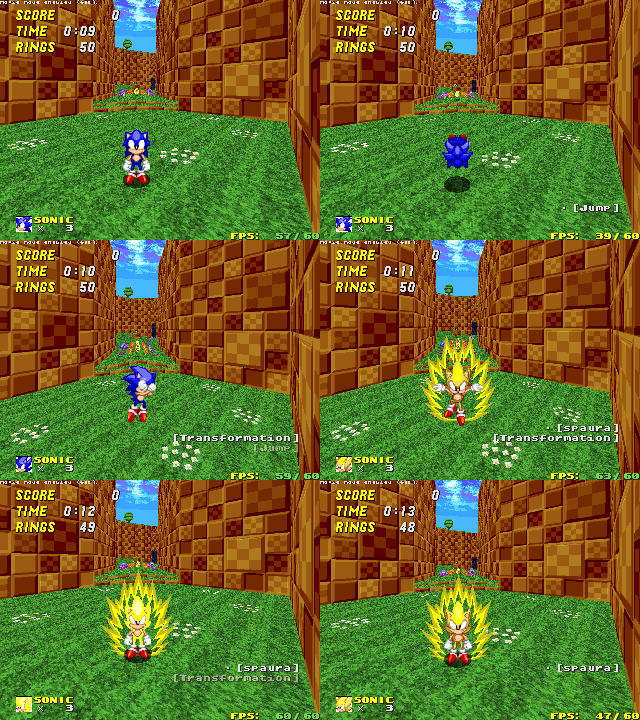
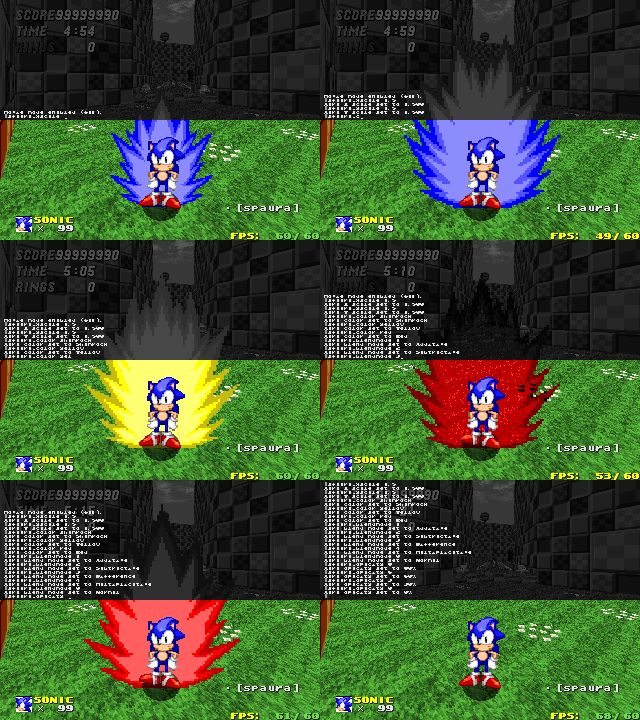
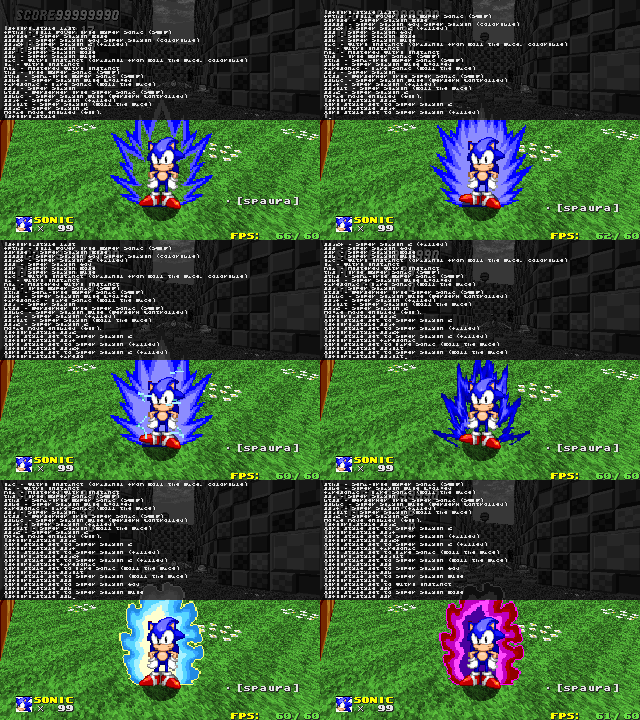
If so, then this addon is for you!
Super Form Auras is an addon that gives the player an aura when they transform into their Super form. It includes customization features for you to play with.
Features:
- Customizable aura size, color, style and sound
- Includes auras from Dragon Ball, Roll the Dice and Sonic's Quest for Power 3
- Ability to activate aura even if the player isn't in their Super form
- Ability to stack a secondary aura alongside the main one
- Ability to activate an outline around the character's sprites
- Compatible with RushChars' Sol form.
For those who are new to this addon, you can change the aura's look and sounds by using the following commands:
sfaura_sounds <on/off>
Sets if the client player can hear their and others' aura sounds. You can set this to OFF if the aura sounds annoy you.sfaura_allowsounds <on/off>
Server-only command. It lets you choose if aura sounds should be played on your server. If set to OFF, no player will ever be able to hear their aura sounds.sfaura_condbutton <none/nextwp/prevwp/fire/firenormal/tossflag/custom1/custom2/custom3>
Sets the button that switches between conditions to activate the aura.- Every time the button is pressed, the conditions will alternate between "Never", "Super/Sol Form Only" and "Always". These should be self-explanatory.
sfaura_style <id>
Sets the aura's style. Typesfaura_style listto check all the valid IDs for aura styles.sfaura_color <valid skincolor/"player"/"opposite">
Sets the aura's color.playermakes your aura's color be the same as your current skincolor.oppositemakes your aura's color be the opposite of your current skincolor.- Keep in mind that some aura styles may not be colorable, meaning that this setting won't have effect on them. SFA will inform you of this in that case.
sfaura_soundsch <id>
Sets the sounds that the aura should use. Typesfaura_soundsch listto check all the valid IDs for aura sound schemes.- Note that using the "None" sound scheme is different from setting
sfaura_soundsto OFF: the former only makes your aura silent (you will still hear other players' auras), while the latter makes you be unable to hear any aura sounds coming from you or other players.
- Note that using the "None" sound scheme is different from setting
If you need more control over your aura's look and sounds, you can use these commands:
sfaura_xscale <values from 0 to 5, decimals allowed>
Sets the aura's X size (width).sfaura_yscale <values from 0 to 5, decimals allowed>
Sets the aura's Y size (height).sfaura_xscale2 <values from 0 to 5, decimals allowed>
Sets the secondary aura's X size.sfaura_yscale2 <values from 0 to 5, decimals allowed>
Sets the secondary aura's Y size.sfaura_opacity <values from 0 to 10>
Sets the aura's opacity. The values range from 0% (invisible) to 100% (fully visible).sfaura_opacity2 <values from 0 to 10>
Sets the secondary aura's opacity. This option is set to 0% by default, so if you want to activate the second aura, set this to a different value.sfaura_color2 <valid skincolor / player / opposite>
Sets the secondary aura's color.sfaura_style2 <id>
Sets the secondary aura's sprite.sfaura_blendmode <normal/add/subtract/difference/multiply>
Sets the aura's blending mode.sfaura_blendmode2 <normal/add/subtract/difference/multiply>
Sets the secondary aura's blending mode.sfaura_outline <on/off>
Sets if the player should have an outline around their character's sprites.sfaura_olcolor <valid skincolor/"player"/"opposite">
Sets the color of the outline.sfaura_olblend <add/substract/multiply>
Sets the blending mode of the outline.
To add a custom aura style, you need to create sprites for it and then freeslot them.
You can also make sprites for the aura's extra effects (which will be the aura's overlay sprites).
Then, put this in your addon's script:
In this example,
You can also make sprites for the aura's extra effects (which will be the aura's overlay sprites).
Then, put this in your addon's script:
Lua:
if not SFA_AuraStyles
    rawset(_G, "SFA_AuraStyles", {})
end

SFA_AuraStyles["custom"] = {
    name = "Custom",
    sprite = SPR_CUST,
    frames = 3,
    tics = 2,
    scale = FRACUNIT,
    blending = AST_ADD,
    colorable = false,
    overlay = SPR_CUSO,
    overlay_frames = 4,
    overlay_scale = 2*FRACUNIT,
    overlay_opacity = FF_TRANS10,
    overlay_blending = AST_ADD,
    overlay_rescalable = false
}"custom" is the ID used to switch to this aura style from sfaura_style. For this example, it would be sfaura_style custom. The variables are:name: The display name of the aura style. It is only shown whensfaura_style listis used.sprite: The sprite that the aura uses.frames: The number of frames that the aura has. Keep in mind that the value shouldn't start with 0; for example, if the aura has three frames, then the value of this variable should be 3.tics: The speed of the aura's animation in tics. The greater this value is, the slower it will be.scale: Optional. The size of the aura as a fixed-point number. Use this if your sprite is either too small or big and you want it to fit with the player's size. If not defined, it's set toFRACUNITby default.blending: Optional. If your aura's sprite is meant to be used with a certain blending mode, then you can set this variable to anAST_*constant. If not defined, the aura will use the blending mode defined by thesfaura_blendmodesettings.colorable: Optional. If your aura's sprites aren't meant to be colorable, then you can set this tofalse, which will disable the ability to change its color through thesfaura_colorcommands. If not defined, it's set totrueby default.
overlay: The aura's overlay sprite. Must be anSPR_*constant, just like withsprite.overlay_frames: The amount of frames the aura's overlay has. Works in the same way asframes.overlay_tics: The speed of the aura's overlay animation in tics. Works in the same way astics.overlay_scale: Optional. The scale of the aura's overlay. Must be a fixed-point number just like withscale.overlay_opacity: Optional. The opacity of the aura's overlay. Must be aFF_TRANS*constant. If not defined, it's opaque by default.overlay_blending: Optional. The blending mode of the aura's overlay. Must be anAST_*constant. If not defined, it's set toAST_TRANSLUCENT(normal blending) by default.overlay_rescalable: Optional. Sets if the aura's overlay should be affected by SFA's scaling commands. If not defined, it's set totrueby default.
To add a custom aura sound scheme, you must have the sounds ready and freesloted for its use.
Then, put this in your addon's script:
In this example,
Then, put this in your addon's script:
Lua:
if not SFA_SoundSchemes
    rawset(_G, "SFA_SoundSchemes", {})
end

SFA_SoundSchemes["custom"] = {
    name = "Custom",
    transform = sfx_custom,
    passive = sfx_custom,
    detransform = sfx_custom,
    passivetics = 12
}
In this example,
"custom" is the ID used to switch to this sound scheme from sfaura_soundsch, just like what I showcased in the spoiler above. The variables are:name: The display name of the sound scheme. Just like the aura styles, this name is only shown whensfaura_soundsch listis used.transform: The sound that is played when the aura is activated.passive: The sound that is played while the aura is active.detransform: The sound that is played when the aura disappears.passivetics: The duration in tics of the aura's passive sound. To calculate this, you just take your sound's length in milliseconds, divide it by 1000, multiply it by 35, and then round the result.
Seezee: I/O Support Resource (edited)
 mb.srb2.org
Dragon Ball: Original auras and sounds overall.
SSG3:
mb.srb2.org
Omegasuper: Source of the SSJ aura
raymanleseir: Original source of Roll the Dice's SSJ aura.
Clairebun: L_DecimalFixed and L_FixedDecimal functions
 wiki.srb2.org
HotDanimus: The original creator of the Ultra Instinct aura sprite used in Roll the Dice
DivinityX: The person who ripped the passive Ultra Instinct aura sounds
Link to the source
Burcol:
TarloEgnaro: Aura sprites for SSG and the SSGSS forms.
Woothrad and LukasAhl1: Source of the SSJ2 aura overlay (lightning sparks)
https://www.deviantart.com/woothrad/art/Super-Saiyan-2-Wounded-Teen-Gohan-Sprite-Sheet-710947554
LgdVegetto: Creator of the SQFP series and the sprites for BTSS, STHS and THS auras.
I ripped them by downloading the SWF files and then using a program named "JPEXS Free Flash Decompiler".
Buggie: Sonic New's super aura code (edited and used for the player outline feature)
mb.srb2.org
[Open Assets] - I/O Support Resource
okay so you guys know the norm of I/O being extremely difficult to some people so here's two luas demonstrating how to do it with either the player's variables or cvar's
mb.srb2.org
Dragon Ball: Original auras and sounds overall.
SSG3:
- Inspiration from Roll the Dice
- Aura sprites from RtD (they are actually owned by other people, just used in RtD)
Form Auras
Ok So I Thought Super Forms Might Look Cooler If It Had An Aura That Could Have It's Size Or Style Changed Within The Console And It Would Match The Super Color Your Character Is Using. Idk How To Code Or Make Sprites So Just An Idea For Now.
mb.srb2.org
Omegasuper: Source of the SSJ aura
raymanleseir: Original source of Roll the Dice's SSJ aura.
Clairebun: L_DecimalFixed and L_FixedDecimal functions
User:Clairebun/Sandbox/Common Lua Functions - SRB2 Wiki
HotDanimus: The original creator of the Ultra Instinct aura sprite used in Roll the Dice
DivinityX: The person who ripped the passive Ultra Instinct aura sounds
Link to the source
Burcol:
- SSJ, SSJ2, SSJ3, SSBKK and SSR passive aura sounds
- SSG draining sound
- SSBKK transform sound
TarloEgnaro: Aura sprites for SSG and the SSGSS forms.
Woothrad and LukasAhl1: Source of the SSJ2 aura overlay (lightning sparks)
https://www.deviantart.com/woothrad/art/Super-Saiyan-2-Wounded-Teen-Gohan-Sprite-Sheet-710947554
LgdVegetto: Creator of the SQFP series and the sprites for BTSS, STHS and THS auras.
I ripped them by downloading the SWF files and then using a program named "JPEXS Free Flash Decompiler".
Buggie: Sonic New's super aura code (edited and used for the player outline feature)
[Open Assets] - Team New
The Team is here! And Recent Tails as addition and some fixed/changes for Sonic and Knuckles. But before the characters some stuff that will be useful. Custom 1 - Action Button. The button used for cool stuff like Cyloop, Tornado and Crouch(More...
mb.srb2.org
If you want to go crazy and create your own transformations, then you may want to use these addons in conjunction with Super Form Auras!
Super Sprites:
mb.srb2.org
DragonBall Z Transformation ColorPack:
mb.srb2.org
Supercolors (for those who need to change the color of their vanilla Super form):
mb.srb2.org
Super Sprites:
Super Sprites
use the supersprites command to change your characters sprites to super, if there are no super sprites it doesn't work SA-Sonic how to restrict your character from using this command (just in case it somehow breaks your mod or you just don't...
mb.srb2.org
[Open Assets] - DragonBall Z Transformation ColorPack
This is a fan-based CUSTOM SKIN COLOR MOD DagonBall,DragonBall Z,DragonBall GT, and DragonBall Super are all own by Funimation,Toei Animation,Shueisha, and Akira Toriyama. Please support the official release. Do you like DragonBall Z? Do...
mb.srb2.org
[Open Assets] - Supercolors
LOAD AFTER ALL CUSTOM SKINCOLORS COLORS NOT INCLUDED MENU USES KEYBOARD CONTROLS ONLY YOUR CHOSEN SUPERCOLOR MIGHT NOT DISPLAY IN CERTAIN MODS/SCENARIOS This mod will generate an animated clone of all super colors loaded! This mod also...
mb.srb2.org
- When you interrupt certain passive aura sounds, they get silenced for some seconds (depending on the length of the sound).
- In OpenGL mode, the characters' followitems are rendered behind the main aura when the player's sprite is in its front view or in its diagonal-front view, causing the followitem to not be visible if the aura's sprite has no transparency inside.
- The aura might clip through the player model if the aura has no transparency inside and models are enabled in OpenGL, making some body parts look like they disappear.
- The player outline feature doesn't work properly with character models enabled in OpenGL.


