- What permissions do you give others to modify and/or maintain your submission?
- Modify: YES - Maintain: YES - I give permission for my entire submission to be modified by others or used in their own work. I give permission for my entire submission to be maintained by others as well.
I would like to share this Linux terminal script, which helps you to dig for script examples.
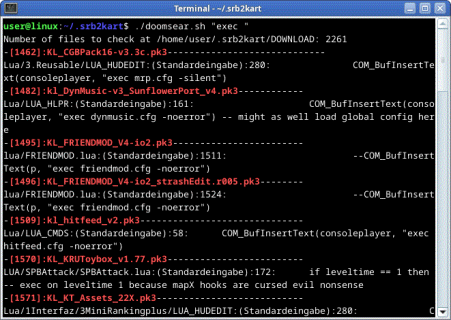
So if you see a specific script term or a command and want to know, how others have used it in their lua scripts, this script will ruffle through all your downloaded Srb2Kart mods and point out all lines, where the search term is appearing. The script will then gather the search results in a text file (being named protocol_'searchterm'.txt).
--------------------------
Usage Examples:
./doomsear.sh rawget
(This will output all instances of "rawget" in Srb2Kart scripts.)
./doomsear.sh "func ="
(Two-part search terms need to be in quotes to be treated as a whole search term.)
./doomsear.sh bestlap KL_MiniRankingPlus-v3.1.pk3
(Alternatively, use a second argument to search inside a specific file.)
-----------------------------
To have a larger amount of samples, you need a big collection of mods in the DOWNLOAD folder of your Srb2Kart folder. Mine is at /home/user/.srb2kart/DOWNLOAD (might be different for you). To pile up some mods, just join different online servers in-game.
This program is really slow. 2000 mods may take about 30 minutes to be searched through. Please be patient and collect your search results after a cup of tea. However you can also observe the terminal, as live "findings" appear there directly.
In the end, the results are hit-or-miss and as only single lines with the given search term are shown, more manual searching inside the found scripts is required. But at least this is a good starting point to where to dig deeper. At the beginning of learning about server scripting, this tool definetly helped me to get the punctuation and variable usage right through search terms like "laps", "kartspeed" or "mapname". So maybe someone else can make use of it too.
--------
Error correction:
- Should one of the target folders be incorrect, you can directly edit the "doomsear.sh" file and change the folders in the configuration part at the beginning of the file.
- To run this bash script, you need a Linux terminal program. It will not work on Windows.
- You need to have the command "zipgrep" installed in your Linux system to run this program.
So if you see a specific script term or a command and want to know, how others have used it in their lua scripts, this script will ruffle through all your downloaded Srb2Kart mods and point out all lines, where the search term is appearing. The script will then gather the search results in a text file (being named protocol_'searchterm'.txt).
--------------------------
Usage Examples:
./doomsear.sh rawget
(This will output all instances of "rawget" in Srb2Kart scripts.)
./doomsear.sh "func ="
(Two-part search terms need to be in quotes to be treated as a whole search term.)
./doomsear.sh bestlap KL_MiniRankingPlus-v3.1.pk3
(Alternatively, use a second argument to search inside a specific file.)
-----------------------------
To have a larger amount of samples, you need a big collection of mods in the DOWNLOAD folder of your Srb2Kart folder. Mine is at /home/user/.srb2kart/DOWNLOAD (might be different for you). To pile up some mods, just join different online servers in-game.
This program is really slow. 2000 mods may take about 30 minutes to be searched through. Please be patient and collect your search results after a cup of tea. However you can also observe the terminal, as live "findings" appear there directly.
In the end, the results are hit-or-miss and as only single lines with the given search term are shown, more manual searching inside the found scripts is required. But at least this is a good starting point to where to dig deeper. At the beginning of learning about server scripting, this tool definetly helped me to get the punctuation and variable usage right through search terms like "laps", "kartspeed" or "mapname". So maybe someone else can make use of it too.
--------
Error correction:
- Should one of the target folders be incorrect, you can directly edit the "doomsear.sh" file and change the folders in the configuration part at the beginning of the file.
- To run this bash script, you need a Linux terminal program. It will not work on Windows.
- You need to have the command "zipgrep" installed in your Linux system to run this program.