i need help trying to run a map i'm trying to make

Wyerframe The Glitch

a dumb wireframe idiot over here.
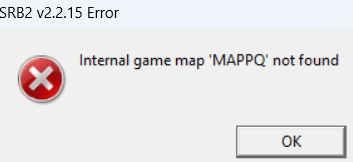
it just crashes saying this
Post automatically merged:

it has no mappq in it so why does it do this
Post automatically merged:

here's the map file for anyone who wants to help
Post automatically merged:

now that i have redone the whole thing, i have a new problem. it now won't run due to the sky having to many bytes (the one on the right is the new one)
 

Attachments
  • Screenshot 2026-07-28 140623.png
    Screenshot 2026-07-28 140623.png
    15.3 KB · Views: 32
  • MAP666.wad
    57.7 KB · Views: 21
  • SKY_666.png
    SKY_666.png
    55.1 KB · Views: 28
  • MAP666.wad
    68.3 KB · Views: 17
Last edited:
ROCK666 is in the JPEG image format, which SRB2 doesn't support (causing a crash). Images need to either be in the PNG or Doom image format, both of which SLADE can convert to.
Also, sky textures need to follow the SKY[I]n[/I] naming convention, so it should be named SKY666 instead of SKY_666.
 
THANK YOU DUDE
Post automatically merged:

Also, do you like how the textures look?
Post automatically merged:

the old problem came back. it's saying some shit about MAPPQ. I HAVE NO IDEA WHAT THAT MEANS.

(I fixed the jpg thing tho. now it's a png)
 

Attachments

  • MAP666.wad
    95.8 KB · Views: 21
Last edited:
the old problem came back. it's saying some shit about MAPPQ. I HAVE NO IDEA WHAT THAT MEANS.
The game says "MAPPQ" beacuse anything above 3 characters or numbers is not supported by SRB2's extended map number system.
When converting the number 666 to the game's extended map number format, it comes up with PQ. As such, i've changed the map's number to PQ to avoid overriding the game's multiplayer 7th special stage. (when truncating, it comes up with map 66, the 7th special stage)

To emulate your idea, i changed the level's keywords, as to be accessible by simply typing "666".
Check out this wiki page if it's still confusing: https://wiki.srb2.org/wiki/Extended_map_number

Also, a few of the variables in the level header either do not exist or are misnamed, such as FirstLevel (doesn't exist within a level header, it should be set via a MainCfg block: check out SPStage_Start in https://wiki.srb2.org/wiki/MainCfg , which i have done) and SelectHeader is supposed to be SelectHeading.

I converted the file from a .wad file to a .PK3 file for ease of use (and also because i have no idea how to use the wad format).
so it should be named SKY666 instead of SKY_666
Also i renamed SKY_666 to SKY666 to make the sky function as mentionned in the above quote.
Also, do you like how the textures look?
Yeah, they're good.
 

Attachments

  • Map666.pk3
    90.7 KB · Views: 23
Last edited:
... extract it how? please remember im a noob if it wasn't obvious
Post automatically merged:

you have discord?
 
extract it how?
It's 2 am so i can't get my pc out, but you need to right-click the wad file, and then choose the "extract" option from the list. It's a blue file icon with an arrow pointing to the right (i'm sorry if i switched up the directions english is not my native language lol)
 
Oh, and to put it back in, you need to select the Maps folder (highlight it in blue), and then click "import" from the menu on the far left of the screen. I forgot what the icon is though, so you'll have to hover your cursor over each icon to know what it is. I'm pretty sure it's either a down arrow, or just a file icon.
 

Who is viewing this thread (Total: 0, Members: 0, Guests: 0)

Back
Top