

- What permissions do you give others to modify and/or maintain your submission?
- Modify: YES - Maintain: YES - I give permission for my entire submission to be modified by others or used in their own work. I give permission for my entire submission to be maintained by others as well.
Teleporters work differently in UDMF (Ultimate Doom Map Format, here used by Ultimate Zone Builder and High Voltage Ring) and Binary (the old Doom map format, here used by Zone Builder).
In Binary, if you're making a non-relative silent teleporter, you need a sector that you tag Linedef type 412 to, along with a Teleport Destination inside the target sector, along with Linedef type 300.
In UDMF, however, you do not need to make any extra sectors just for the Teleport Destination (aside from the control sector); you tag the Teleport Destination instead! This allows you to save some sectors! Well, not much, but anything is good.
When you first do a barebones UDMF port of a map with a teleporter, the teleporters... well, break. Actually, they don't entirely stop functioning, but every Teleport Destination and Teleporter linedef type gets the exact same new tag. Also, for a guide on how to port a SRB2 map to UDMF in general, see here for a tutorial.
Linedef type "300" on the control sector stays fine.
Nothing bad happens to the trigger sectors (you know, the sectors that would... trigger the teleporter).
The control sectors with the Teleporter linedef type all have the same destination tag, but the linedef tag all point to the correct Teleport Destinations.
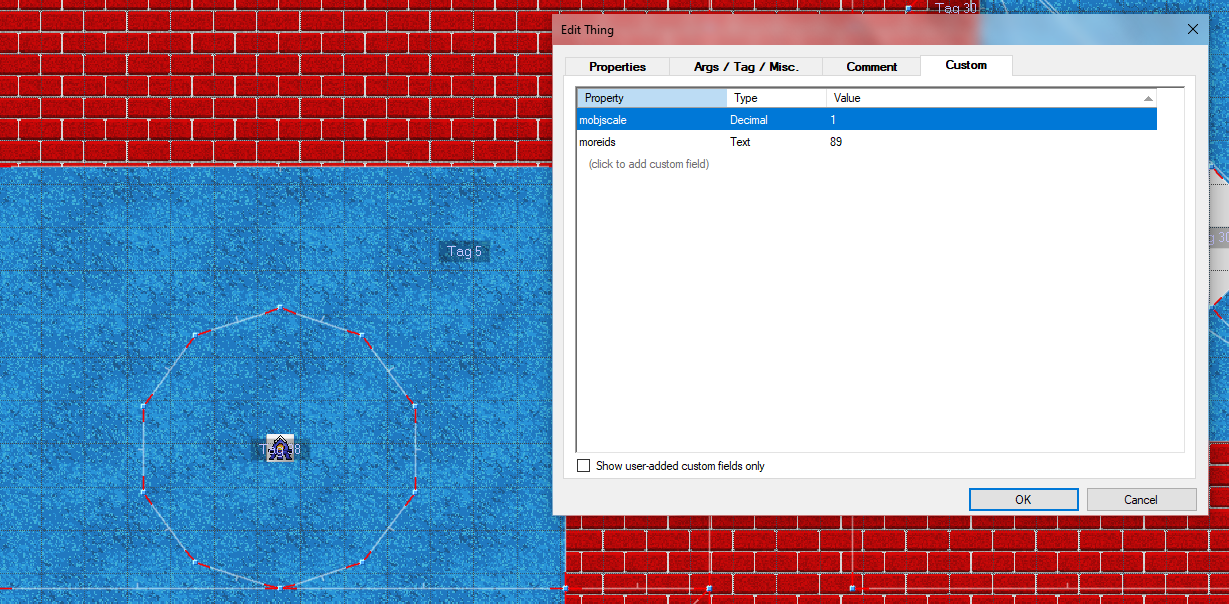
The target sectors stay fine. But not the Teleport Destinations. Not only do they ALL have the same tags, but their tags are not even setup traditionally! A custom text property called "moreids" gets created, and that's where their tag goes.
Now I'm gonna show you how to fix them!
This guide assumes that you have basic Ultimate Zone Builder/High Voltage Ring knowledge.
SIDE NOTE: This uses Cosomania from Starshy's EHZHangout as an example. Credit goes to him for making the map and the level pack itself! I specifically use an indev UDMF version of it, where I attempted to make a skybox and shit. I did not fix the teleporters at this point...

That was all folks. I hope this guide didn't end up being confusing; I tried my best to make it as understandable as possible.
In Binary, if you're making a non-relative silent teleporter, you need a sector that you tag Linedef type 412 to, along with a Teleport Destination inside the target sector, along with Linedef type 300.
In UDMF, however, you do not need to make any extra sectors just for the Teleport Destination (aside from the control sector); you tag the Teleport Destination instead! This allows you to save some sectors! Well, not much, but anything is good.
When you first do a barebones UDMF port of a map with a teleporter, the teleporters... well, break. Actually, they don't entirely stop functioning, but every Teleport Destination and Teleporter linedef type gets the exact same new tag. Also, for a guide on how to port a SRB2 map to UDMF in general, see here for a tutorial.
Linedef type "300" on the control sector stays fine.
Nothing bad happens to the trigger sectors (you know, the sectors that would... trigger the teleporter).
The control sectors with the Teleporter linedef type all have the same destination tag, but the linedef tag all point to the correct Teleport Destinations.
The target sectors stay fine. But not the Teleport Destinations. Not only do they ALL have the same tags, but their tags are not even setup traditionally! A custom text property called "moreids" gets created, and that's where their tag goes.
Now I'm gonna show you how to fix them!
This guide assumes that you have basic Ultimate Zone Builder/High Voltage Ring knowledge.
SIDE NOTE: This uses Cosomania from Starshy's EHZHangout as an example. Credit goes to him for making the map and the level pack itself! I specifically use an indev UDMF version of it, where I attempted to make a skybox and shit. I did not fix the teleporters at this point...
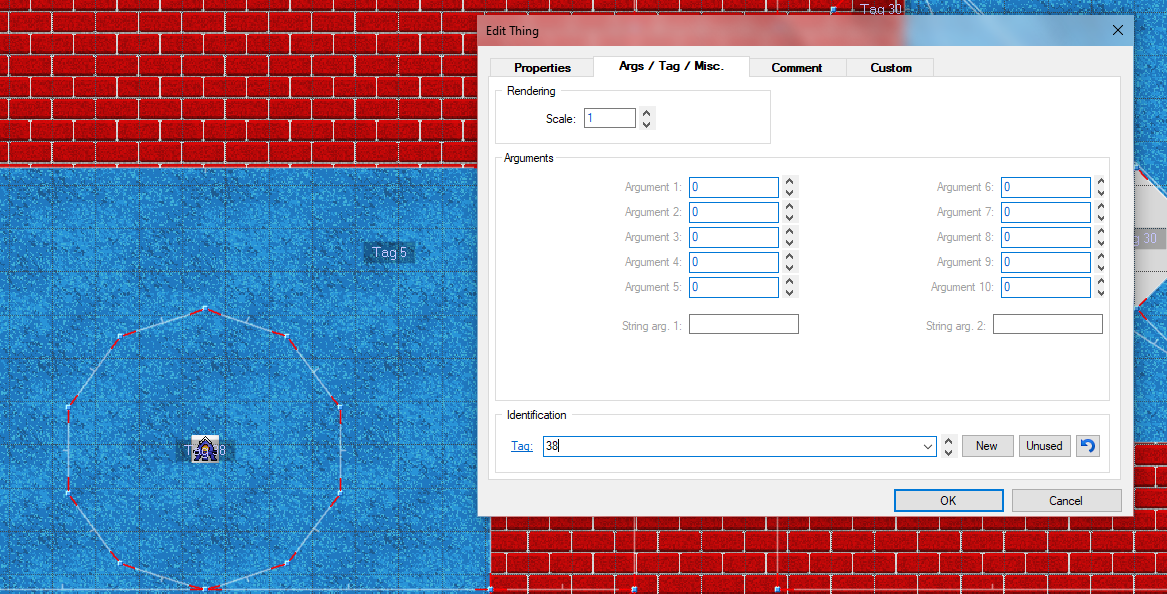
1. Okay, first, right-click on the Teleport Destination, and set its actual tag (not the custom text property called "moreids", you'll bother with that after this) to the one the sector where it's located uses.
As its sector uses tag 38, so will the Teleport Destination too.
2. Next, click on "Custom", then click ONLY on "moreids" and press Delete.
3. Now, IF you have a sector like the above, then what you should do is delete the unnecessary sector that it's located in. I do this by just merging that and the exact-same sector around it. I click on the non-teleporter sector first, and then on the teleporter one, and then I merge them (Shift+J is the shortcut)!
The sector that I just deleted has no differences from the sector it's in, aside from the tag. The heights are the same too. Just a smaller copy of that carpet for teleporting. Who needs this in UDMF?
If there is no extra now-unnecessary sector made just for the purpose of teleporting you, then you just change the tag to something else or maybe just keep it as it is, if it uses a FOF.
Let's keep going with the "extra sector murder" route.
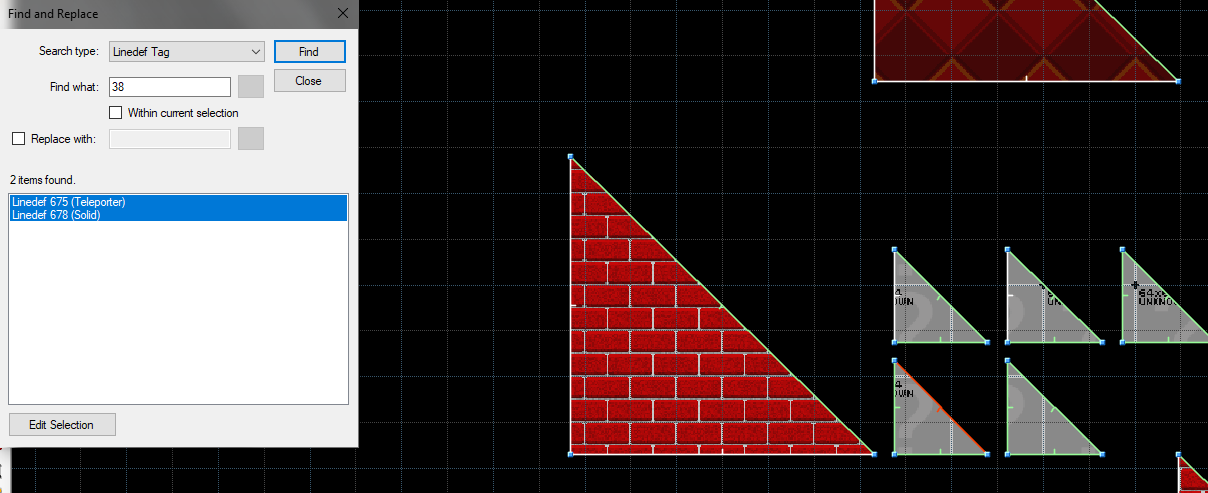
4. Find the Teleporter that was made for that sector and the Teleport Destination. You can very easily do this by going to Find & Replace Mode (F3 is the shortcut), selecting Linedef Tag as the search type, then inputting in the Teleport Destination's tag. Obviously, the "Teleporter" linedef is what we're looking for.
5. Now, right-click on the linedef. You don't even need to close Find and Replace Mode just for this, you can just right-click on "Linedef X (Teleporter)" there! Or select only that and press "Edit Selection". Up to you.
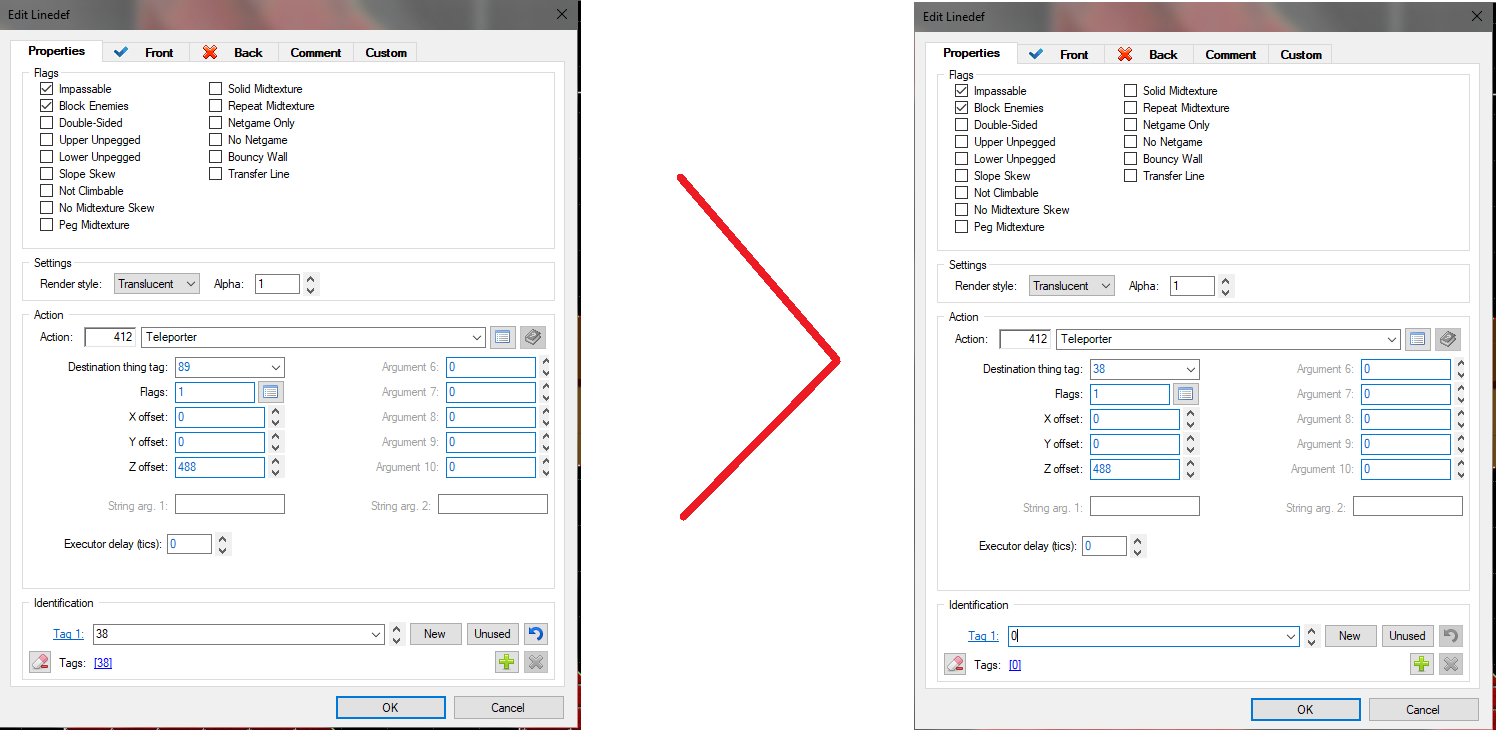
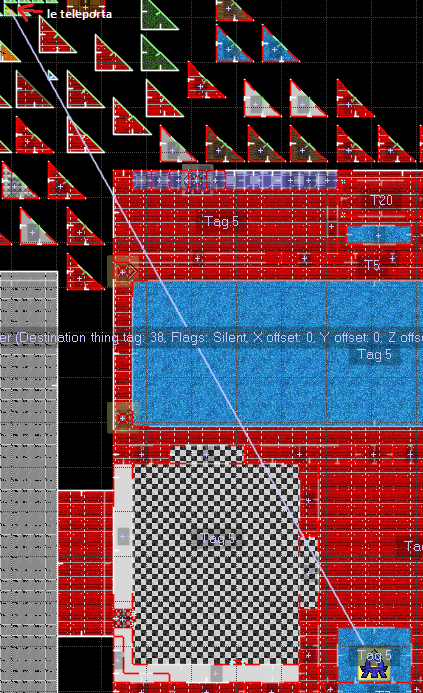
As I've mentioned in the beginning, the tag of the linedef and the destination thing tag are different. Additionally, here, the Z offset is set too for some reason. We don't need this, UNLESS we're talking about a teleporter with the "Relative silent" flag. Well, we are not talking about that here, so let's just proceed.
The linedef tag is the tag that we need; we need to disregard the broken destination thing tag.
6. Copy the linedef tag and paste it into the destination thing tag, then remove the linedef tag itself!
As we can see, this teleporter now works completely fine!
That was all folks. I hope this guide didn't end up being confusing; I tried my best to make it as understandable as possible.


